In the Turkish version of this post's title I used "İşleri Yoluna Koyma" — "putting things on track" — a Turkish name for GTD that I made up myself. These days everything is so fast and so urgent. Something arriving as urgent no longer makes it a priority; even working out how much of a priority it is compared to the "urgent tasks" that came before it has become a job of its own. If you can't keep up with incoming email, and find it hard to manage personal to-dos and the projects and tasks in your working life, I have a software recommendation for you: OmniFocus.
I previously wrote about GTD in Elma Dergisi in a post titled Remember The Milk; I recommend having a look at that too.
Of course, OmniFocus isn't a magic wand that makes your work disappear or does it for you. What OmniFocus actually does is give you a window onto it. The approach it uses is the method from David Allen's 2002 book Getting Things Done (GTD). The book became so popular that companies offering GTD training and consulting began to appear. Before talking about OmniFocus, it's worth explaining GTD.
First, here's a short video summarizing GTD:
https://www.youtube.com/watch?v=IZp0eHCOEJs
The core idea of GTD is that all your "stuff" is collected and processed in one central place. You can think of the "stuff" GTD talks about as "anything that occupies your mind and needs to be brought to a conclusion". An email you need to send, a proposal to prepare, yogurt to pick up from the corner shop on the way home, the vehicle tax to pay, a birthday present for your spouse, a photo archive to organize — everything!
When I found a diagram of the GTD workflow on the D*I*Y Planner site, rather than redrawing it I simply translated it into Turkish:
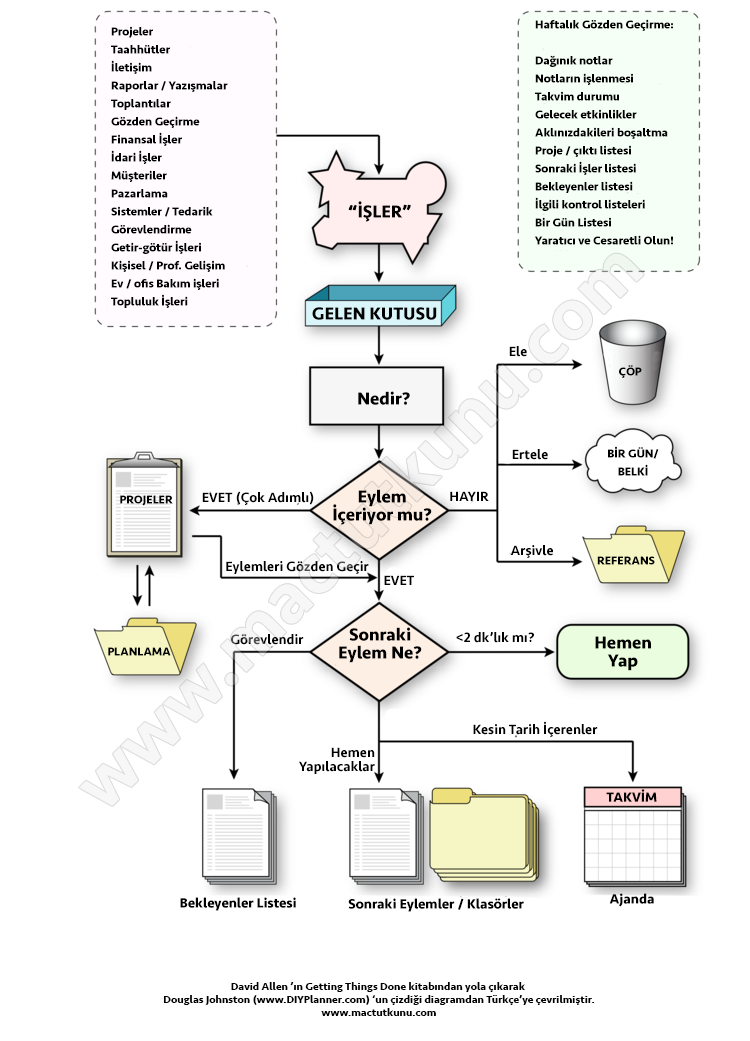
The critical points of the GTD method are discipline and determination. I've been practicing it for about four years and can say it has helped me a great deal. Because what bothers you is not so much the amount of work as the worry that you've forgotten or missed something. Once you write all your tasks down in a list and categorize them, then prioritize them and start working through them, you'll feel the weight on your shoulders get lighter. The first thing to do is to "empty your head". Take a pen and paper and start writing a list:
- Send a proposal to Company X, deadline this Friday (at work)
- Check whether the order I placed with Y has arrived (at work)
- Call Mr. Ahmet and update him on the project (phone)
- Pick up the shirts from the dry cleaner (evening, on the way home)
- Fix the leaking tap at home (someday)
- Pay the vehicle tax (every year, end of January and end of July)
- Buy a USB 3 cable in Kadıköy at the weekend
- …..
- …..
- …..
Once you've made a list like this, you need to "trust" it. Now it's clear what needs to be done, so there's no need to worry. Sometimes things pile up so much that while I'm on the phone at work someone comes over and tells me something, I write it on the notepad in front of me (and forget it), and it comes back to me at some random hour of the night. That's exactly why everything needs to be gathered into this list — that's the critical point. Since you won't always have a pen and paper with you, the basic approach is to set up an "inbox". Notes from work, meeting notes, what's on the whiteboard, incoming faxes, what you scribble while on the phone — collect it all in one box or tray. Later, enter it into the tool you use for GTD.
There are many tools you can use for GTD. You can use just pen and paper, or choose software built specifically for this, like OmniFocus. There are lots of options besides OmniFocus too. You could write your tasks line by line in a simple notes app, but with apps and services like Things, Remember The Milk, zendone and do.it, you get features such as prioritizing tasks, ordering them by date, linking them to contexts, regular reviews and automatic reminders.
In the GTD method, it's very important to process your inbox regularly (following the workflow above) and to review all your tasks at regular intervals. I usually do my review on Sunday evening: I remind myself what I need to do that week, and going over everything in the quiet of the evening helps me head off the Monday blues (!).
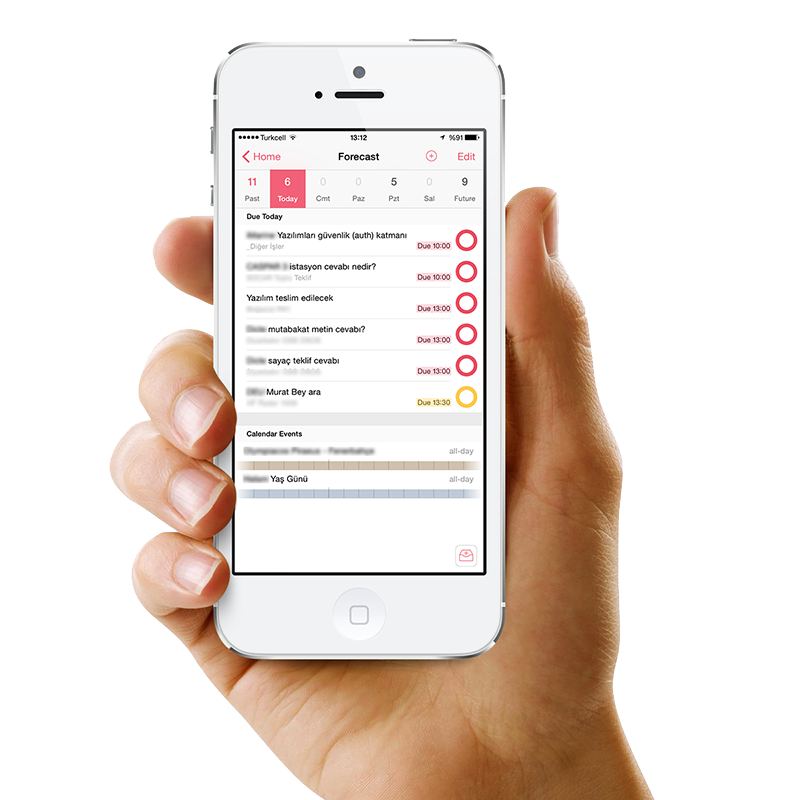
I should also mention that OmniFocus has iOS apps. If you want to review and edit your to-do list when you're away from the computer, definitely get them:
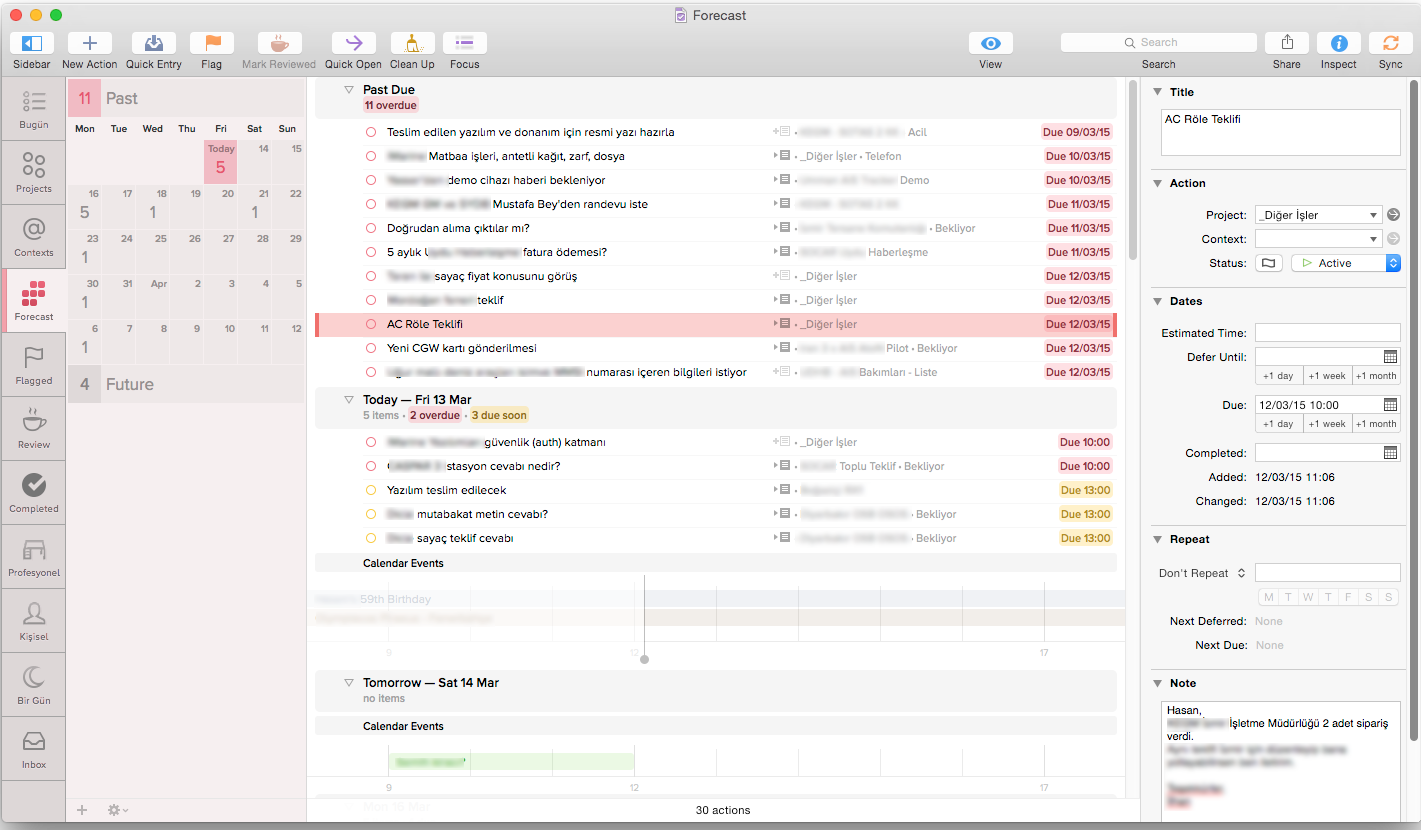
Below you can see my to-do list in OmniFocus for OS X, from the "near future" perspective:
Over the past four years I've tried many different apps, and I consider OmniFocus the most customizable and flexible (adaptable) software for this. It's also the most expensive: right now it costs 85 TL on the App Store, and if you buy the Pro option inside the app, you pay another 85 TL. At 170 TL, it costs more than today's operating systems! But before buying, I recommend downloading the 14-day trial here and using it.
In the next post I plan to cover topics like categorizing in OmniFocus, creating perspectives and adding contexts to actions. Until then, empty your head!
0 Comments
Leave a comment