One of the blogs I follow closely for Apple products and app reviews on iOS and OS X is MacSparky. David Sparks, who usually covers new products and apps on his blog, regularly publishes interviews about the home screens of iPhone and iPad users. Introducing apps through people's actual experience, rather than going through apps one by one with screenshots and feature lists, felt much more practical to me, so I wanted to write a similar post.
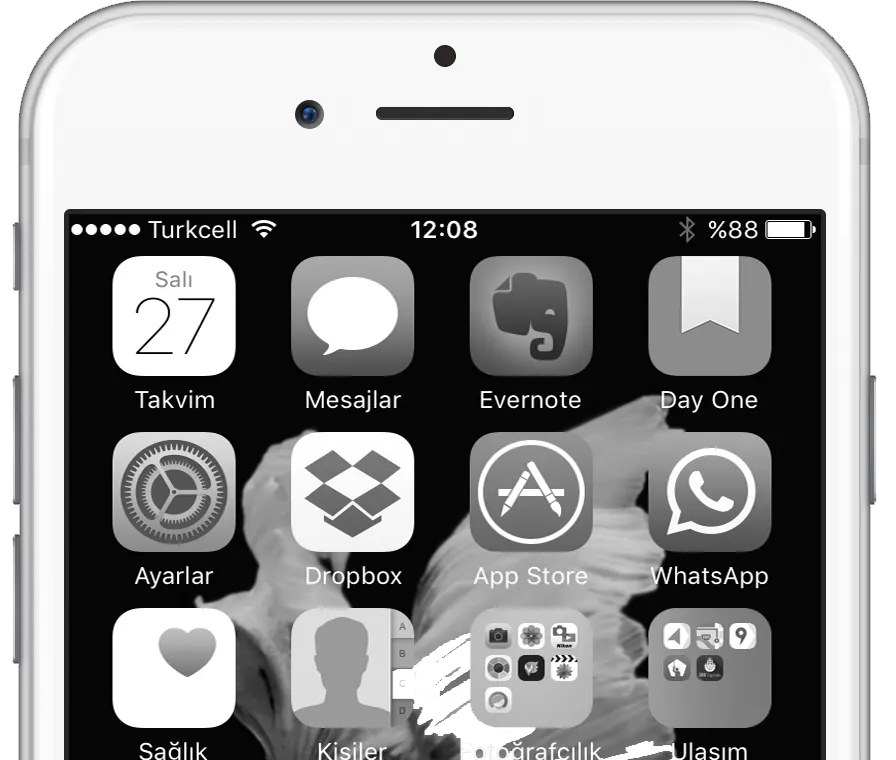
In this post you'll find the apps I use most on my iPhone and how I use it.
My Favorite Apps
DayOne and Things are the iOS apps I use most. I've been keeping a journal in DayOne on and off, especially since my daughter was born. The nice thing is that you don't only write: you can snap a photo in the moment, add a one-line comment underneath, and capture that moment, that day. Uploading existing photos to DayOne from the share menu, Dropbox support, syncing with the OS X client, and recording the weather and your activity at the time are its other nice features. Things is a practical app that lets me keep my to-dos according to the GTD methodology. I used to use OmniFocus, but because of its complicated interface and structure I switched to Things, which offers a more practical solution.
Screen Layout
I don't have hundreds of apps on my iPhone, and I don't play games. So I tried to make things easier to reach by grouping apps into folders by type and keeping everything on a single page. The apps I use very often I kept outside folders so I can open them with a single tap.
The Ones I Use Most
Like many people, I consider Dropbox my favorite cloud platform. Apple offers iCloud and opened up its own iCloud Drive app with iOS 9, but it still hasn't matched Dropbox's app support and how easy Dropbox makes sharing files. That's why all the files I care about and want to reach from different platforms are in Dropbox.
Evernote, which I've written about many times before, is my "paperless life" platform where I keep all my notes. The iOS app's ability to photograph business cards and save them automatically to your contacts is great. With many extra features like voice notes, adding links and attaching scanned images, Evernote is one of my essentials.
1Password is a password manager I also use constantly on OS X. It's very good on iOS too, and works with Touch ID.
I bought Facetune for very little during a big discount. It's an app for quickly making all sorts of edits to portrait photos taken with the iPhone, like lighting and blemish removal.
Trafi, in my Transport folder, is an excellent app I turn to often when I take public transport in Istanbul. It lists the best, shortest or cheapest public transport and transfer options from where you are, or between any two points.
Living in Istanbul, setting off without checking the traffic is unthinkable. For that, Yandex Maps and İBB CepTrafik are my essentials.
Besides these, of course, Facebook, Instagram, Twitter and Spotify are other apps I use often.
Others
Runkeeper is a popular fitness app I use, if rarely, to track my walks. For internet radio I use TuneIn and Power.
What Would Be Great to Have?
I think a WordPress blog editor for iOS that lets you take and edit photos, and an FTP client on par with FileZilla, would be nice.
0 Comments
Leave a comment